
 纯净分享
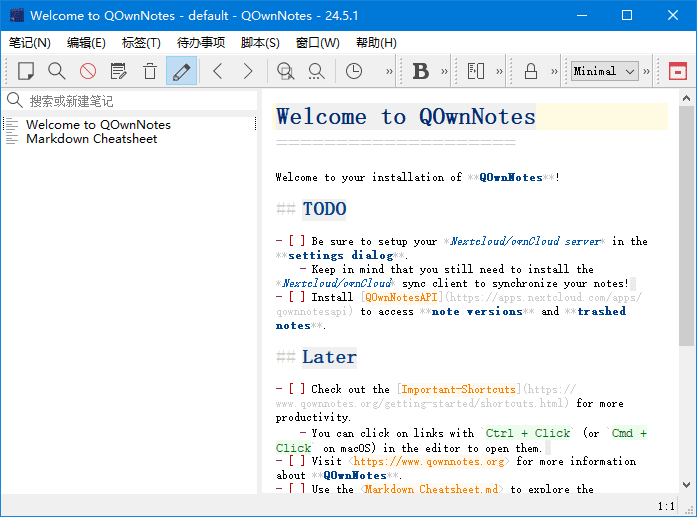
纯净分享QOwnNotes是一款开源免费的跨平台笔记应用,无需安装、解压即用,支持 Markdown 编辑、多端云同步、AI 辅助创作与脚本扩展,兼顾个人日常笔记、任务管理与知识整理需求,适配 Windows、Mac、Linux 系统,是注重数据隐私与个性化的用户的优质选择。
下载地址
跨平台笔记应用程序 QOwnNotes v26.3.23 中文绿色版
- 夸克:https://pan.quark.cn/s/a71809917f55
- 百度:https://pan.baidu.com/s/1DIVX0bXTOkQqm6wflZSckw?pwd=88in
- 迅雷:https://pan.xunlei.com/s/VOi157XPZZzuTNKtCqcHmQ4LA1?pwd=7wx5#
核心功能
- 多格式编辑与高效排版原生支持 Markdown 编辑器,语法高亮实时预览,轻松实现标题、列表、链接、图片嵌入等排版效果;同时兼容 HTML 与纯文本编辑模式,满足不同用户的编辑习惯;支持自定义编辑器主题与字体大小,打造舒适的书写环境。
- 智能笔记管理与检索
- 标签分类:可为单篇笔记添加多个自定义标签,通过标签快速筛选同类笔记,构建个人知识分类体系。
- 超强搜索能力:支持全文搜索与正则表达式搜索,可设置专属快捷键触发搜索,精准定位笔记内容;搭配笔记标题、创建时间等筛选条件,大幅提升检索效率。
- 多账户管理:可同时管理多个笔记账户,每个账户独立存储笔记与配置,适合区分工作、生活等不同场景的笔记内容。
- 安全云同步与数据恢复支持与 Nextcloud、ownCloud、Dropbox 等主流云服务同步,笔记数据实时备份,跨设备访问无缝衔接;内置版本回溯功能,可恢复笔记的历史版本,误删内容也能一键找回,彻底杜绝数据丢失风险。
- 实用拓展功能
- 任务与清单管理:可在笔记中创建待办清单,标记完成状态,兼顾笔记记录与任务管理双重需求。
- AI 辅助创作:集成 AI 功能,支持智能续写、内容润色、关键词提取,提升笔记创作效率。
- 丰富导出选项:可将笔记导出为 PDF、HTML、Markdown 等多种格式,方便分享、打印或存档。
- 脚本扩展:支持通过自定义脚本拓展功能,高级用户可根据需求编写插件,实现个性化功能定制。
软件特点
- 跨平台无缝兼容完美支持 Windows、Mac、Linux 三大操作系统,笔记与配置可跨设备同步,在不同系统上保持一致的使用体验,适合多设备办公用户。
- 开源免费隐私优先基于开源协议开发,无订阅费用、无广告植入;笔记数据默认存储在本地,云同步需手动开启,用户可完全掌控自己的数据,避免隐私泄露风险。
- 轻量化低资源占用软件体积仅 36.5MB,启动速度快,运行时占用内存与 CPU 资源极少,即使长期后台运行也不会拖累系统性能。
- 人性化细节优化v25.12.6 版本优化了收藏图标对比度,为浅色与深色模式分别适配本地图标,视觉体验更舒适;自动记忆笔记编辑状态,再次打开时恢复上次的编辑位置。
使用提示
- 利用正则表达式搜索功能,可快速查找包含特定格式的内容(如邮箱、手机号等),提升检索精准度。
- 首次使用建议在设置中配置云同步账户,开启自动同步与版本回溯功能,保障笔记数据安全。
- 编辑长笔记时可使用 Markdown 标题分级功能,搭配标签分类,让知识体系更清晰。
中文切换
按照此步骤 note > settings > interface > 简化字 > 设置,重启软件,即可完成修改。
更新日志
26.3.23
A warning dialog is now shown when deleting a note (or multiple notes)
that are referenced by links in other notes, informing the user that the
deletion will leave those links broken and offering the option to cancel;
the check is performed for both single-note removal and bulk removal
(for #3202)
When a note subfolder is renamed, a confirmation dialog is now shown
offering to update all relative Markdown links
([text](../old_folder/note.md) and <../old_folder/note.md>) across
affected notes to reflect the new folder name; both plain and URL-encoded
path variants are handled (for #3213)
Added a new Color modes settings page under Interface settings that allows
users to create custom color mode profiles with dark mode, icon theme, and
editor color schema settings; built-in Light and Dark modes are provided and
cannot be deleted, while users can create as many custom modes as needed
(for #3526)
The dark mode settings, icon theme settings (internal/system/dark mode icon
theme), and editor color schema selection were moved from the Interface and
Editor settings to the Color modes page
Replaced the Qt5 AppImage build with the Qt6 AppImage build in the release
workflow so the primary AppImage now ships with Qt 6.10.2 instead of Qt 5.15.2,
bringing improved scripting support, QML/Quick integration and OpenSSL 3;
the release asset name QOwnNotes-x86_64.AppImage is preserved so the
in-app auto-update process continues to work seamlessly
(for #3074)
The Qt6 AppImage, which was on Qt 6.5.3, was made ready to work with Qt 6.10.2
1.本站所提供的压缩包若无特别说明,解压密码均为www.4mf.net;
2.下载后文件若为压缩包格式,请安装7Z软件或者其它压缩软件进行解压;
3.文件比较大的时候,建议使用下载工具进行下载,浏览器下载有时候会自动中断,导致下载错误;
4.资源可能会由于内容问题被和谐,导致下载链接不可用,遇到此问题,请到文章页面进行留言反馈,以便及时进行更新;
5.下载资源版权归作者所有;本站所有资源均来源于网络,仅供学习使用,请支持正版!下载后请注意杀毒。





评论前必须登录!
立即登录 注册